An AI chat that only returns text is quick to build into an app and quickly useless. The work starts after the answer: reading it, retyping it, carrying it over to the right screen. For the app that VorFina designed for insurance brokers, we therefore built the chat so that it answers with UI building blocks. This post shows what that looks like in Flutter. The screenshots are from the German app.
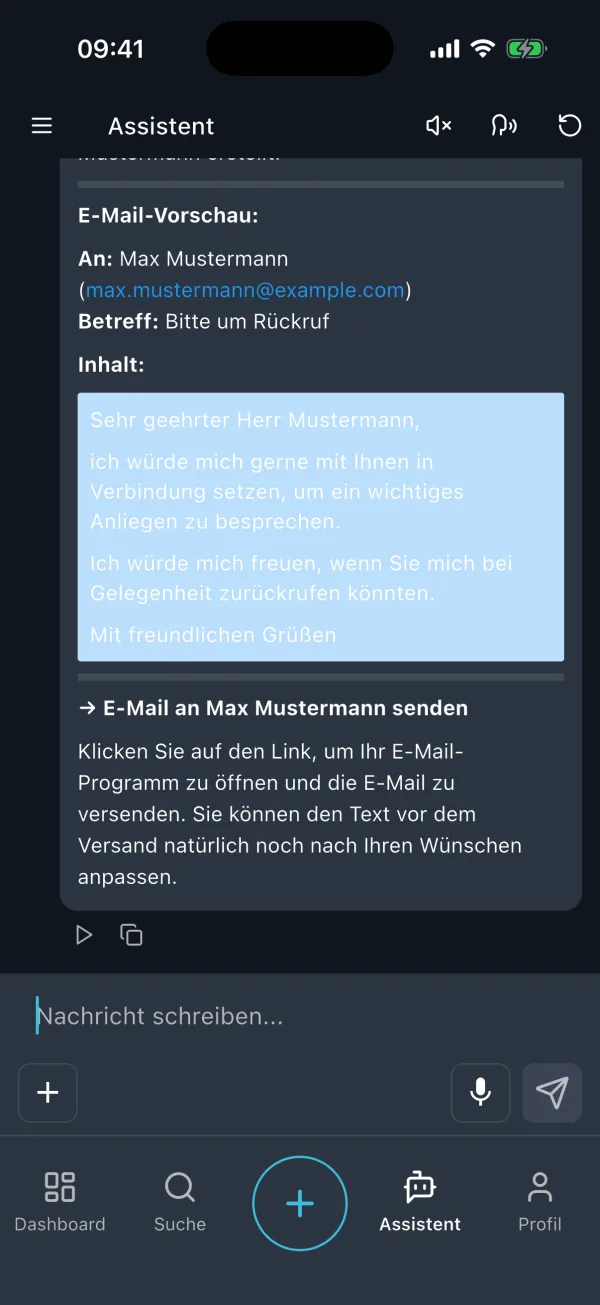
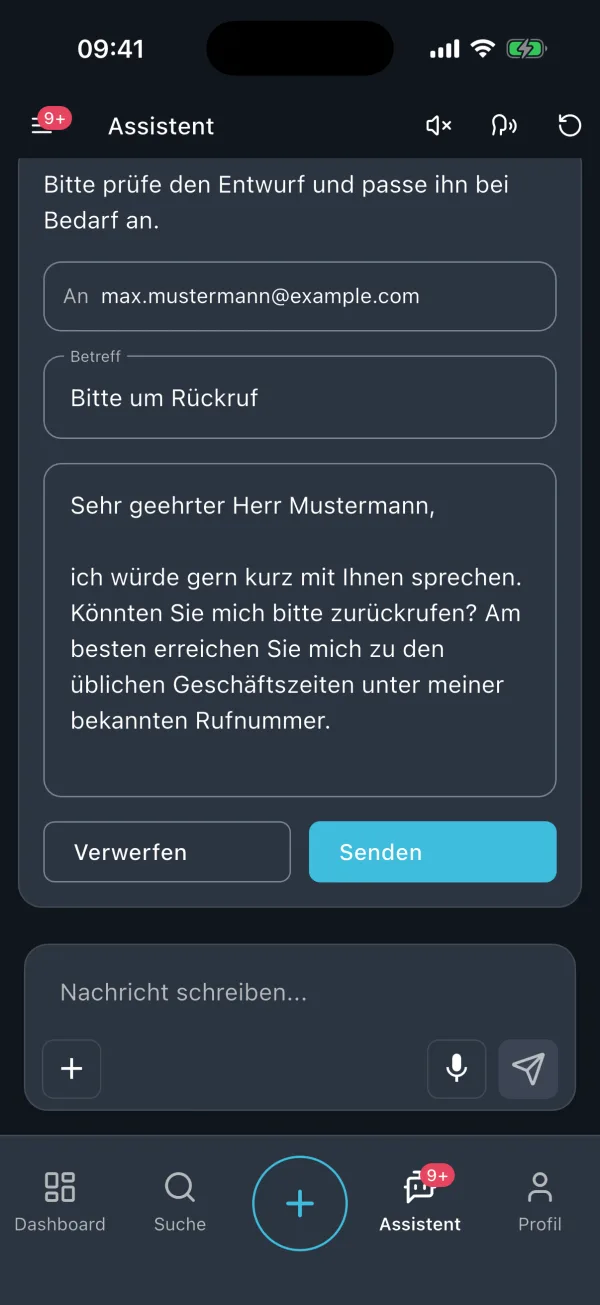
In short: The language model does not draw any UI. For each tool, the backend decides which block carries the answer, and the Flutter app has exactly one widget per block. The types are sealed classes, the dispatch is a switch without a default branch, and anything this app version does not know ends up in a visible fallback instead of a crash. A gallery of every block is part of the project.
Why text is not enough as an answer
The first version of the chat answered in Markdown. If the broker wanted to send an email, they got a preview in running text and a link that opened the mail app. Technically correct, but a detour for the person: read it again, adjust it, send it yourself.
The rule since then: the chat may run reading tools on its own. Before every writing tool it asks for confirmation, and that confirmation has to be comfortable to read. A text list of field name, colon and value is not a confirmation, it is a reflex. Why this matters so much to us is covered in An AI chat that only talks, or one that gets things done on our sister site (in German). This post is about the Flutter side.
The contract between backend and app
The backend talks to the model and runs the tools. For each answer, the app receives a list of blocks: text, a display block, a widget block waiting for input, or an attachment. The display block carries a typed payload. In Dart that is a sealed class with one variant per backend tool:
@freezed
sealed class BlockPayload with _$BlockPayload {
  const factory BlockPayload.table({
    required List<String> headers,
    required List<List<String>> rows,
    String? title,
  }) = TablePayload;

  const factory BlockPayload.confirm({
    required String message,
    @Default(false) bool destructive,
  }) = ConfirmPayload;

  const factory BlockPayload.email({
    required List<String> to,
    required String subject,
    required String body,
    // ...
  }) = EmailPayload;

  /// A payload type this client version does not know.
  const factory BlockPayload.unknown({
    required String type,
    required Map<String, dynamic> raw,
  }) = UnknownPayload;
}
There are eleven variants today: table, table with a jump into the customer file, metrics, bar and line chart, pie chart, download, confirmation, selection, quick choices, form and email draft. The twelfth variant is unknown, and it is the most important one.
Parsing never throws. An unknown type becomes an UnknownPayload, carrying the raw data and a log entry, so that monitoring tells us which app version did not know which block. This lets the backend ship new blocks before the app has caught up in the store. The user sees a notice instead of an empty space.
The toolkit at a glance
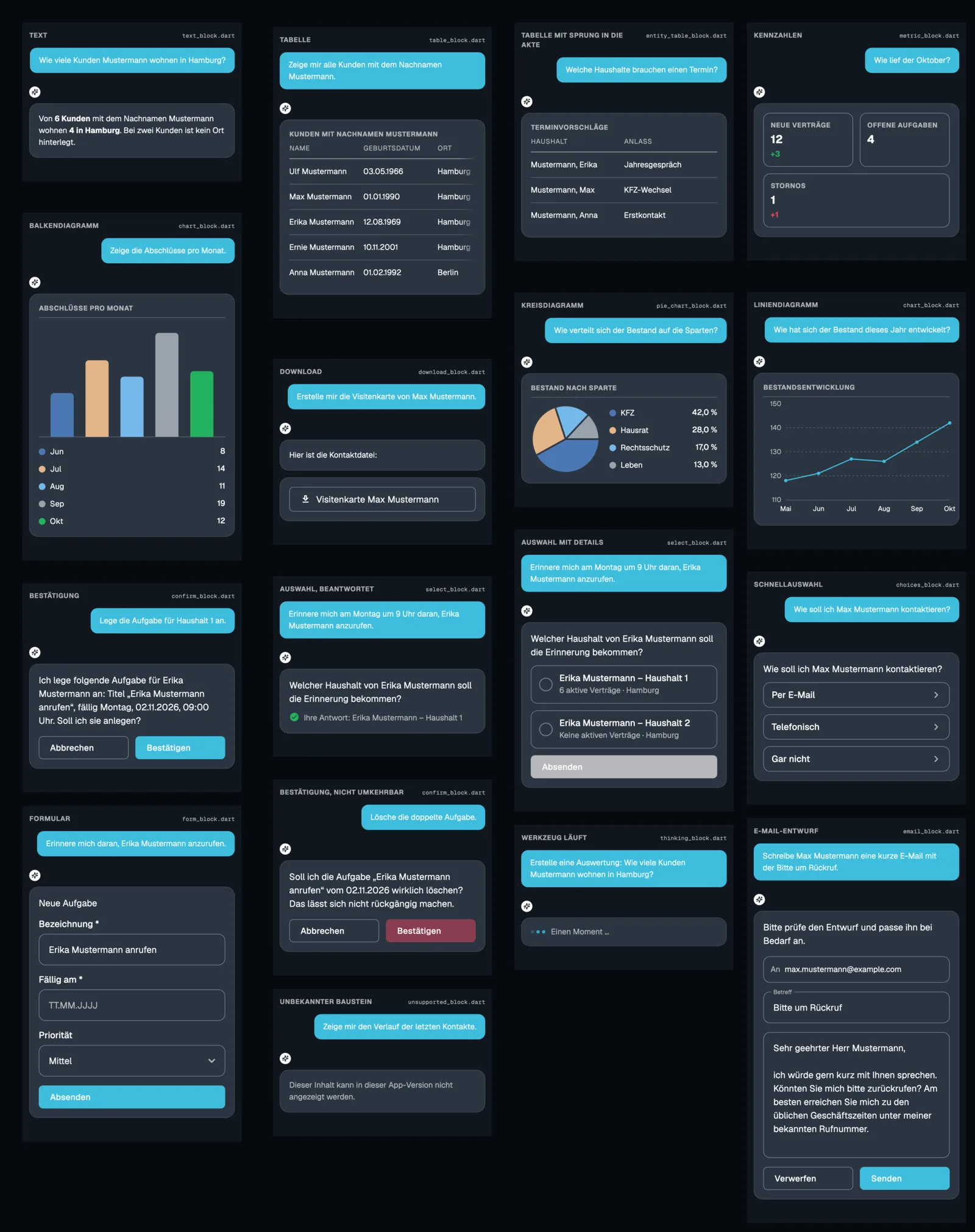
Each block is its own widget in its own file, and all of them sit in the same card. The card, the uppercase heading, the divider, the outlined inner box for metrics and input fields: those are four small widgets that every block reuses. As a result, an answer with a table, a chart and a form reads like one UI and not like three.
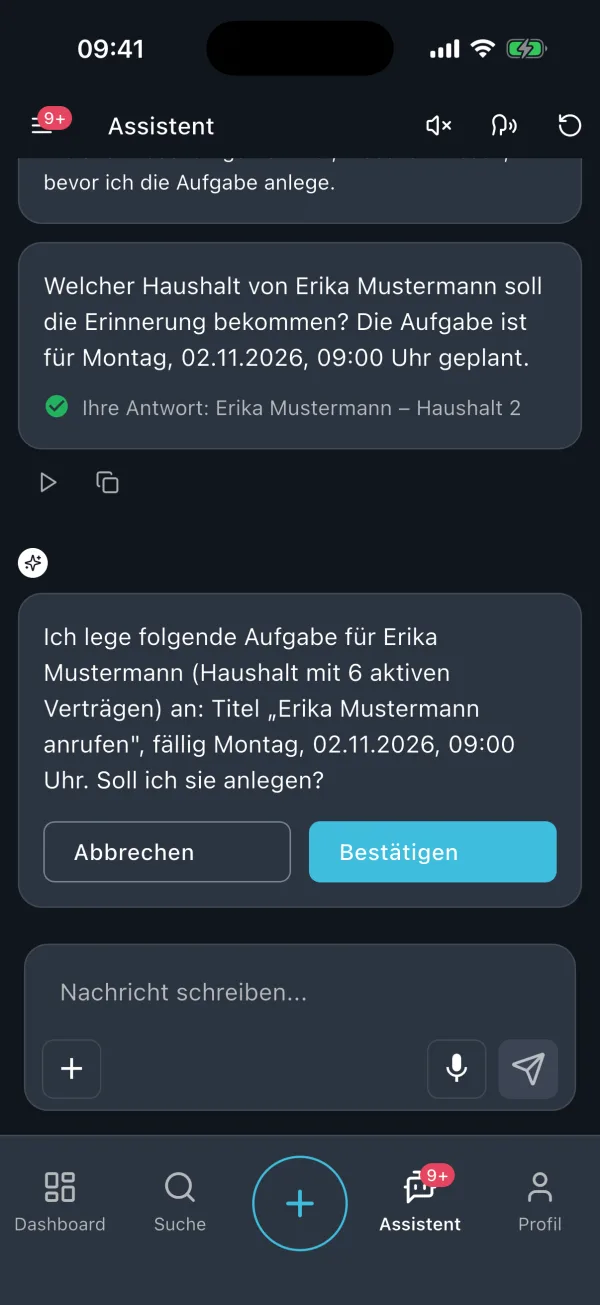
A detail that only shows up in use: when a widget block is answered, the card switches from the form to a single line with the given answer. This switch runs through an AnimatedSwitcher inside an AnimatedSize, so the cards below slide up instead of jumping. A hard cut at this point looks like a bug.
A switch that does not stay silent
The mapping from block to widget is a single widget, BlockHost. Its build is a switch over the sealed classes, without a default branch:
Widget _display(BlockPayload payload) => switch (payload) {
  final TablePayload payload => TableBlock(payload: payload),
  final MetricPayload payload => MetricBlock(payload: payload),
  final ChartPayload payload => ChartBlock(payload: payload),
  // ...
  _ => _unsupported('display payload ${payload.runtimeType}'),
};
The wildcard branch at the end only catches UnknownPayload. When a new variant enters the sealed class, the compiler reports every place that does not handle it yet. A new block in the backend is therefore a compile error in the app, not a gap that a customer finds first. At runtime, older app versions keep the fallback.
Widget blocks additionally carry an interrupt ID and a submitted state. The backend pauses the conversation until the app answers with that ID and the value. When an old conversation is loaded, the blocks come back already answered, and the widget shows the answer instead of the buttons. The same rendering for “answered just now” and “answered a week ago” is not a coincidence, it is a requirement.
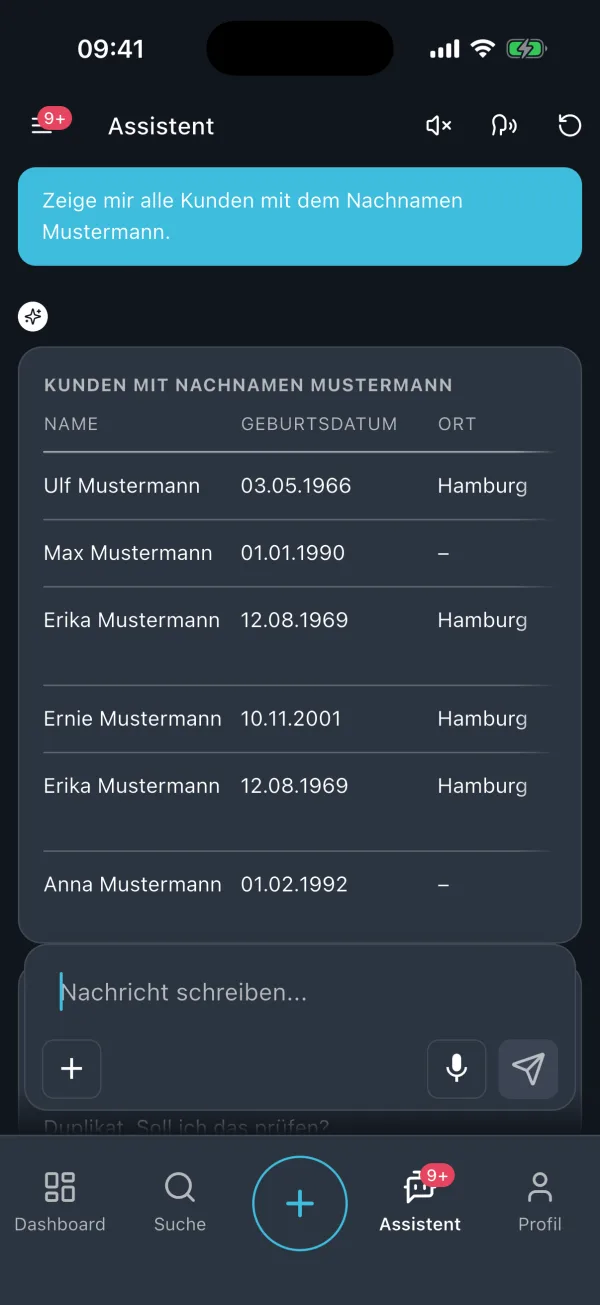
The chat itself: an adapted toolkit
The chat view is based on the Flutter AI Toolkit, which we keep as a package in the monorepo and have extended. The most important addition is a blockBuilder: in our case, an agent’s message is not a string but a list of blocks, and the toolkit calls our BlockHost for each block. The answer arrives as a stream from the backend. Because the view rebuilds with every chunk, the message view caches its rendered result per revision of the message. Otherwise every table would be rebuilt with every chunk of text, and a long conversation would get slower with every answer.
Charts come from fl_chart, the theme from shadcn_flutter, the state from Riverpod. None of this is exotic. The work is not in choosing the packages but in the contract about who decides what.
Seeing every block in every state
A block that nobody looks at until a customer triggers it is a block with a bug. The pie chart with a single segment, the table with eight columns, the bar below zero, the form that has already been answered: someone has to see all of these regularly, without having to push the backend into exactly that state.
For this, the app has a block gallery, reachable from the settings in the debug build. It renders fixed test data through the real chat view, the real style and the same BlockHost as in production. Each entry names the file that draws it, so a block that looks wrong points straight to its source. The image above was produced from those same fixtures.
Widgetbook
If you would rather not maintain such a gallery yourself, use Widgetbook. It shows every widget in every state, in light and dark mode, at every device size, with knobs for the inputs. With Widgetbook Cloud this gallery is attached to every pull request, and you compare the blocks version by version before anything reaches the store. In our projects it is the biggest help against UIs that only look good in the ideal case.
On top of that, there are widget tests per block. A small harness hosts a single block without chat, without providers and without backend, and records which answer the block reported. The tests check that a confirmation shows both buttons, that an answered block no longer shows them, that only table rows with a reference are tappable, and that an unknown block renders a notice instead of throwing.
What we would do earlier next time
- Settle on one tone of voice before the first text comes out of the backend. Today the chat answers use the informal German “du”, while the cards and suggestions use the formal “Sie”. That is not a Flutter problem, it just becomes visible in Flutter.
- Plan for wide tables as a case from the start. Five columns on a phone can scroll sideways, and that is it. The backend should know that it is serving a phone.
- Put chart labels in the legend, not under the bars. Compound nouns like “Bestandsprovision” overlap from the third bar onwards otherwise.
What this means for your Flutter team
If you are building an AI chat into an existing app, these questions help you get started:
- Who decides which block carries an answer? The model, the backend or the app. For us it is the backend, and the app knows a fixed list.
- What happens with a block that this app version does not know? Crash, empty space or notice. Only the third is acceptable.
- Can you see every block in every state today, without bothering the backend? If not: a gallery or Widgetbook, before the next block arrives.
- Does an answered block look the same after a reload as it did right after tapping it?
- Can the chat be tested without a backend? A harness that hosts one block is built in an hour and saves weeks.
An AI chat is a feature like any other: it belongs in the plan for a new Flutter app, or it goes into an MVP as a clearly scoped block to test whether your users take to it. What AI features mean for the budget is covered in What does a Flutter app cost?
If you are planning a chat like this in your Flutter app, we are happy to show you in a first call how our toolkit is structured and which blocks your case needs.